5. Deploy Ubuntu and a web application

5. Prepare Ubuntu, create an Azure Local VM, and add a web application
The final demonstration VM is an Azure Local VM enabled by Azure Arc, created through the Azure control plane and stored on a Cluster Shared Volume. Do not create an unmanaged local VM as a substitute and assume it will appear in the portal.
5.1 Check the platform and storage path
Complete the platform gates in chapter 3. Use an authenticated, single-account Azure CLI context, then enter the identifiers locally. The private fields remain masked in this public guide. The example uses the same generic lab names as the migration chapter.
Stage inputs and authority: require a supported generalized Generation 2 image, provenance/checksum, healthy user CSV/storage path, free destination capacity, approved VLAN 200 reservations, a dedicated guest key, and authorized Azure VM/network/image operations. Azure resource permission is distinct from local Hyper-V/cluster rights and from Ubuntu sudo/SSH. The image builder's administrator may prepare that isolated builder; that permission does not authorize editing a control-plane-managed workload disk. Verify Azure sign-in and subscription selection succeed before any following create request.
In the proposed ALZ design, the application team's VM/guest-management resources align with Local's Applications subscription, while cluster/bridge/custom-location dependencies align with Azure Local Clusters. The examples use the actual single-subscription lab, not an implemented multi-subscription landing zone. Validate support for shared-resource references and scope delegation before separating them; moving a resource group is not a substitute for a supported placement design. A resource's management-group membership supplies no route to its NIC.
This stage maps identity to Azure, builder and guest privileges; resource organization to workload ownership; networking to VLAN/DNS/egress; security/governance to image and access controls; management to backup/restore and monitoring; automation to reproducible image/script artifacts; and tenant/billing to approved scope and retention. Apply ALZ controls in Audit first against these HybridCompute/AzureStackHCI APIs, including guest-agent and bridge operations, before enforcing Deny.
$ErrorActionPreference = 'Stop'
$Sub = Read-Host 'Subscription ID'
$Tenant = Read-Host 'Tenant ID'
$Rg = Read-Host 'Existing Azure Local resource-group name'
$Location = 'australiaeast'
$env:AZURE_CONFIG_DIR = Join-Path $HOME '.azure-local-lab'
az login --tenant $Tenant --use-device-code --output none
az account set --subscription $Sub
$Custom = az customlocation show --subscription $Sub --resource-group $Rg `
  --name jumpstart --query id -o tsv
if ($LASTEXITCODE -or -not $Custom) { throw 'Custom location is unavailable.' }
az stack-hci-vm storagepath list --subscription $Sub --resource-group $Rg `
  --query "[].{Name:name,State:properties.provisioningState,Path:properties.path}" -o table
$StorageName = Read-Host 'Select an existing healthy user storage-path name'
$Storage = az stack-hci-vm storagepath show --subscription $Sub --resource-group $Rg `
  --name $StorageName --query id -o tsv
if ($LASTEXITCODE -or -not $Storage) { throw 'Storage path is unavailable.' }
Require both cluster nodes Up, storage healthy, enough free shared capacity, and matching external workload switches. The OS disk and VM configuration must be on shared cluster storage for this exercise. A disk on the outer VM's local C: drive is not shared cluster storage.
5.2 Prepare a Generation 2 Ubuntu image
Use the official Ubuntu image preparation procedure. An ordinary Azure Marketplace VHD is not automatically compatible with Azure Local provisioning. The supported preparation path below uses a temporary Hyper-V image-builder VM and an official Ubuntu 22.04 or 24.04 LTS ISO.
- Download an official Ubuntu Server ISO and verify its publisher checksum. On a preparation Hyper-V machine, create a new VM named UbuntuImagePrep with Generation 2, 2 vCPU, 4 GiB and a 32 GiB VHDX. Attach the ISO and a working private network.
- Enable Secure Boot with the Microsoft UEFI Certificate Authority template. Install Ubuntu, create a temporary builder account, and enable OpenSSH. This builder is separate from AzLHOST1, AzLHOST2 and the final Azure Local VM.
- Install the Azure kernel, SSH and Hyper-V integration components. Reboot only the builder VM, then verify the running kernel and network before generalization.
# Inside only the new Ubuntu image-builder guest:
sudo apt-get update
sudo apt-get install -y linux-azure linux-cloud-tools-azure openssh-server openssh-client cloud-init
sudo systemctl enable --now ssh
# Reboot the image-builder guest from its console, then confirm:
uname -r
ip -4 address
modinfo hv_sock
Before generalizing, use sudo dpkg-reconfigure cloud-init to select NoCloud and deselect the Azure datasource. Verify /etc/cloud/cloud.cfg.d/90_dpkg.cfg contains datasource_list: [ NoCloud ]. Keep administrative sudo access limited to the designated provisioning account rather than granting every user passwordless sudo.
Run the cleanup below only on the image-builder guest. It removes builder-specific cloud/network identity so the final VM can be provisioned with its own NIC, user and key. Remove the temporary builder account's authorized SSH key and lock or remove that builder account before distributing the image. Arrange a root console session for final cleanup; never distribute an image containing working builder access credentials.
# IMAGE BUILDER ONLY. Never run this on an existing workload or cluster node.
sudo rm -f /etc/cloud/cloud.cfg.d/50-curtin-networking.cfg \
  /etc/cloud/cloud.cfg.d/curtin-preserve-sources.cfg \
  /etc/cloud/cloud.cfg.d/99-installer.cfg \
  /etc/cloud/cloud.cfg.d/subiquity-disable-cloudinit-networking.cfg \
  /etc/cloud/ds-identify.cfg
sudo rm -f /etc/netplan/*.yaml
sudo cloud-init clean --logs --seed --machine-id
sudo rm -f /etc/ssh/ssh_host_*
sudo apt-get clean
sync
sudo systemctl poweroff
After the builder is Off, copy its VHDX to a dedicated directory in an existing user CSV, for example C:\ClusterStorage\UserStorage_1\Images\ubuntu24-prepared.vhdx. Compare SHA256 before and after copying. Do not copy an actively written OS disk or change existing managed VM disk formats. Keep original image licensing and provenance with your private build records.
5.3 Import the prepared image through Azure
$ImagePath = Read-Host 'Prepared VHDX path on the cluster shared volume'
az stack-hci-vm image create --subscription $Sub --resource-group $Rg `
  --name ubuntu24-motion-image --custom-location $Custom `
  --location $Location --os-type Linux --image-path $ImagePath `
  --storage-path-id $Storage
if ($LASTEXITCODE) { throw 'Image import failed; inspect before retrying.' }
az stack-hci-vm image show --subscription $Sub --resource-group $Rg `
  --name ubuntu24-motion-image --query properties.provisioningState -o tsv
Require Succeeded before creating the final VM. The historical lab used a checksum-verified Canonical generic UEFI/GPT cloud image, converted and prepared on an isolated builder. The ISO path above avoids presenting that custom conversion as an upstream guarantee.
5.4 Create the private VM network and NIC
These addresses are an example for the existing LocalBox VLAN 200 router. Verify the actual switch, gateway, DNS and unused pool first. Do not overwrite an existing network or reuse the AKS VLAN 110 network.
$Az = 'C:\Program Files\Microsoft SDKs\Azure\CLI2\python.exe'
& $Az -IBm azure.cli stack-hci-vm network lnet create `
  --subscription $Sub --resource-group $Rg --location $Location `
  --name localbox-vm-lnet-vlan200 --custom-location $Custom `
  --vm-switch-name 'ConvergedSwitch(compute_management)' `
  --ip-allocation-method Static --address-prefixes 192.168.200.0/24 `
  --gateway 192.168.200.1 --dns-servers 192.168.1.254 --vlan 200 `
  --ip-pool-start 192.168.200.50 --ip-pool-end 192.168.200.59 --ip-pool-type vm
if ($LASTEXITCODE) { throw 'VM logical network creation failed.' }
az stack-hci-vm network nic create --subscription $Sub --resource-group $Rg `
  --name ubuntu-motion-nic --custom-location $Custom --location $Location `
  --subnet-id localbox-vm-lnet-vlan200 --ip-address 192.168.200.50 `
  --dns-servers 192.168.1.254
if ($LASTEXITCODE) { throw 'VM NIC creation failed.' }
5.5 Create the final portal-managed VM without putting a password in CLI arguments
Generate a dedicated owner-restricted SSH key using the PowerShell 7 key-generation pattern in chapter 4, at $HOME\.ssh\azure-local-vm. Never overwrite a key used by an existing VM. Before the write, inspect the resource group and stop if ubuntu-motion already exists.
The following uses the documented stable ARM schema to specify exactly 2 processors and 4096 MB. This also avoids an installed CLI version's unconditional password prompt in an SSH-only create flow. The password is entered with Get-Credential and used only in the HTTPS request body in memory; do not print the payload, token or credential. Guest SSH password authentication stays disabled.
$Key = Join-Path $HOME '.ssh\azure-local-vm'
if (-not (Test-Path "$Key.pub")) { throw 'Create the dedicated authorized VM key first.' }
$VmName = 'ubuntu-motion'
$Scope = "/subscriptions/$Sub/resourceGroups/$Rg"
$MachineId = "$Scope/providers/Microsoft.HybridCompute/machines/$VmName"
$ImageId = "$Scope/providers/Microsoft.AzureStackHCI/galleryImages/ubuntu24-motion-image"
$NicId = "$Scope/providers/Microsoft.AzureStackHCI/networkInterfaces/ubuntu-motion-nic"
$Credential = Get-Credential -UserName 'azureuser' -Message 'New VM administrator credential'
$Token = az account get-access-token --subscription $Sub `
  --resource https://management.azure.com/ -o json | ConvertFrom-Json
if ($LASTEXITCODE -or -not $Token.accessToken) { throw 'Cannot acquire ARM authorization.' }
$Headers = @{Authorization="Bearer $($Token.accessToken)"}
$Parent = @{
  location=$Location; kind='HCI'; identity=@{type='SystemAssigned'}
}
$null = Invoke-RestMethod -Method Put -Headers $Headers -ContentType 'application/json' `
  -Uri "https://management.azure.com${MachineId}?api-version=2024-07-10" `
  -Body ($Parent | ConvertTo-Json -Depth 5)
$Body = @{
  extendedLocation=@{name=$Custom;type='CustomLocation'}
  properties=@{
    hardwareProfile=@{vmSize='Custom';processors=2;memoryMB=4096}
    osProfile=@{
      computerName=$VmName;adminUsername=$Credential.UserName
      adminPassword=$Credential.GetNetworkCredential().Password
      linuxConfiguration=@{
        disablePasswordAuthentication=$true
        provisionVMAgent=$true;provisionVMConfigAgent=$true
        ssh=@{publicKeys=@(@{
          path="/home/$($Credential.UserName)/.ssh/authorized_keys"
          keyData=(Get-Content "$Key.pub" -Raw).Trim()
        })}
      }
    }
    networkProfile=@{networkInterfaces=@(@{id=$NicId})}
    storageProfile=@{imageReference=@{id=$ImageId};vmConfigStoragePathId=$Storage}
    securityProfile=@{enableTPM=$false;uefiSettings=@{secureBootEnabled=$true}}
  }
}
$Uri = "https://management.azure.com$MachineId/providers/Microsoft.AzureStackHCI/virtualMachineInstances/default?api-version=2024-01-01"
$Result = Invoke-RestMethod -Method Put -Uri $Uri -Headers $Headers `
  -ContentType 'application/json' -Body ($Body | ConvertTo-Json -Depth 12)
Remove-Variable Body,Credential,Token
# Poll the existing resource; do not submit another create while Accepted/Provisioning.
$Deadline = (Get-Date).AddMinutes(30)
while ($Result.properties.provisioningState -notin @('Succeeded','Failed','Canceled')) {
  if ((Get-Date) -gt $Deadline) { throw 'Still pending; inspect this operation before retrying.' }
  Start-Sleep -Seconds 20
  $Result = Invoke-RestMethod -Uri $Uri -Headers $Headers
}
if ($Result.properties.provisioningState -ne 'Succeeded') {
  throw 'VM provisioning failed. Read the resource error without exposing secrets.'
}
Remove-Variable Headers
az connectedmachine show --subscription $Sub --resource-group $Rg `
  --name $VmName --query status -o tsv
Require the VM Running and the guest Arc agent Connected, not just a created parent machine resource. In the local cluster, find the actual Hyper-V VM and cluster role rather than assuming the ARM vmId equals the Hyper-V VMId. The recorded lab exposed different identifiers at those layers.
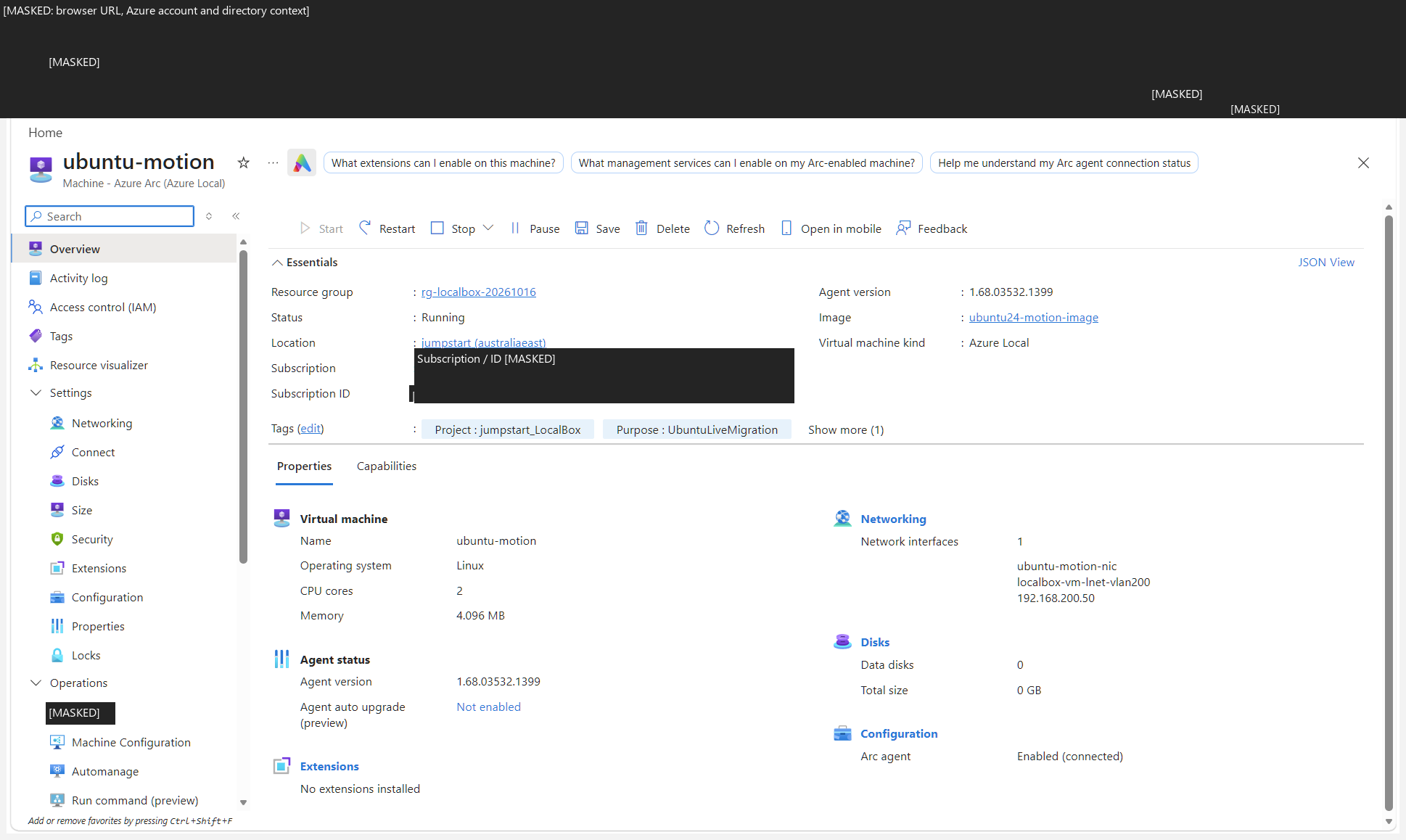
5.6 Install the separate simple NGINX application
Open a guest shell with az ssh arc as shown in chapter 6. Download the script from the guide's code directory, inspect it locally, then run it inside the Ubuntu guest. Do not run it on a cluster node or an existing production web server without reviewing the changes. The website is a static guest-identity snapshot generated at installation and boot, not a dynamic VM-owner detector.
# Inside only your authorized Ubuntu workload guest:
curl --fail --show-error --location \
  https://ibranibeny.github.io/azure-local-landing-zone-l400/code/install-vm-web.sh \
  --output install-vm-web.sh
less install-vm-web.sh
# Run only after reviewing the downloaded file:
sudo bash install-vm-web.sh
curl --fail http://127.0.0.1:8081/
sudo systemctl status azure-local-nginx-demo.service --no-pager
Complete VM NGINX installation code
#!/usr/bin/env bash
# Install a separate, loopback-only NGINX identity demonstration on Ubuntu.
set -euo pipefail
umask 022

if [[ ${EUID} -ne 0 ]]; then
    printf 'Run this reviewed script with sudo bash install-vm-web.sh\n' >&2
    exit 1
fi

. /etc/os-release
if [[ ${ID} != ubuntu || ! ${VERSION_ID} =~ ^(22\.04|24\.04)$ ]]; then
    printf 'Supported guest operating systems: Ubuntu 22.04 and 24.04 LTS.\n' >&2
    exit 1
fi

site=/etc/nginx/conf.d/azure-local-nginx-demo.conf
marker='# Managed by install-vm-web.sh (Azure Local demo).'
if [[ -L ${site} ]]; then
    printf 'Refusing to replace a symbolic link: %s\n' "${site}" >&2
    exit 1
fi
if [[ -e ${site} ]] && ! grep -Fxq "${marker}" "${site}"; then
    printf 'Refusing to overwrite an unmanaged NGINX configuration: %s\n' "${site}" >&2
    exit 1
fi

export DEBIAN_FRONTEND=noninteractive
existing_nginx=false
if command -v nginx >/dev/null 2>&1; then existing_nginx=true; fi
apt-get update
apt-get install -y --no-install-recommends nginx python3 curl iproute2
if [[ ${existing_nginx} == false && -L /etc/nginx/sites-enabled/default ]] &&
   [[ $(readlink -f /etc/nginx/sites-enabled/default) == /etc/nginx/sites-available/default ]]; then
    rm /etc/nginx/sites-enabled/default
fi

install -d -o root -g root -m 0755 \
    /usr/local/lib/azure-local-nginx-demo \
    /var/www/azure-local-nginx-demo

cat > /usr/local/lib/azure-local-nginx-demo/render-identity.py <<'PY'
#!/usr/bin/env python3
"""Render a guest identity snapshot; this does not discover cluster ownership."""
import datetime
import html
import json
import pathlib
import platform
import socket
import subprocess


def command(*args):
    return subprocess.check_output(args, text=True, timeout=10).strip()


interfaces = json.loads(command("ip", "-j", "-4", "address", "show", "scope", "global"))
addresses = [
    (interface["ifname"], address["local"])
    for interface in interfaces
    for address in interface.get("addr_info", [])
    if address.get("family") == "inet" and address.get("scope") == "global"
]
fqdn_result = subprocess.run(
    ["hostname", "--fqdn"], capture_output=True, text=True, timeout=10, check=False
)
fqdn = fqdn_result.stdout.strip() if fqdn_result.returncode == 0 else socket.getfqdn()
fields = [
    ("Guest hostname", socket.gethostname()),
    ("Guest FQDN (local resolver result)", fqdn),
    ("Guest kernel", platform.release()),
    ("Guest boot ID", pathlib.Path("/proc/sys/kernel/random/boot_id").read_text().strip()),
    ("Snapshot generated (UTC)", datetime.datetime.now(datetime.timezone.utc).isoformat()),
]
fields.extend((f"Guest IPv4 on {interface}", address) for interface, address in addresses)
if not addresses:
    fields.append(("Guest IPv4", "No global IPv4 address at snapshot time"))
rows = "\n".join(
    f"<tr><th scope=\"row\">{html.escape(label)}</th><td>{html.escape(value)}</td></tr>"
    for label, value in fields
)
document = (
    "<!doctype html>\n<html lang=\"en\"><head><meta charset=\"utf-8\">"
    "<meta name=\"viewport\" content=\"width=device-width,initial-scale=1\">"
    "<title>Azure Local guest identity snapshot</title></head><body>"
    "<h1>Ubuntu VM: NGINX demonstration</h1>"
    "<p>This is a static guest snapshot, regenerated at installation and each boot. "
    "It is not live telemetry and does not identify the owning Hyper-V node.</p>"
    "<table><caption>Guest identity at snapshot time</caption><tbody>"
    + rows
    + "</tbody></table>"
    "<p>For a fresh snapshot, restart azure-local-nginx-demo.service inside this guest. "
    "Verify cluster ownership separately in Failover Cluster Manager.</p>"
    "</body></html>\n"
)
destination = pathlib.Path("/var/www/azure-local-nginx-demo/index.html")
destination.write_text(document, encoding="utf-8")
destination.chmod(0o644)
PY
chmod 0644 /usr/local/lib/azure-local-nginx-demo/render-identity.py

cat > /etc/systemd/system/azure-local-nginx-demo.service <<'UNIT'
[Unit]
Description=Generate the Azure Local NGINX guest identity snapshot
Wants=network-online.target
After=network-online.target
Before=nginx.service

[Service]
Type=oneshot
ExecStart=/usr/bin/python3 /usr/local/lib/azure-local-nginx-demo/render-identity.py
RemainAfterExit=yes
User=root
Group=root
NoNewPrivileges=yes
PrivateTmp=yes
ProtectHome=yes
ProtectSystem=strict
ReadWritePaths=/var/www/azure-local-nginx-demo

[Install]
WantedBy=multi-user.target
UNIT

cat > "${site}" <<'NGINX'
# Managed by install-vm-web.sh (Azure Local demo).
server {
    listen 127.0.0.1:8081;
    server_name _;
    server_tokens off;
    root /var/www/azure-local-nginx-demo;
    index index.html;
    access_log off;
    add_header Cache-Control "no-store" always;
    location / {
        try_files $uri $uri/ =404;
    }
}
NGINX

python3 -m py_compile /usr/local/lib/azure-local-nginx-demo/render-identity.py
nginx -t
systemctl daemon-reload
systemctl enable azure-local-nginx-demo.service
systemctl restart azure-local-nginx-demo.service
systemctl enable nginx.service
if systemctl is-active --quiet nginx.service; then
    systemctl reload nginx.service
else
    systemctl start nginx.service
fi
curl --fail --silent --show-error --max-time 10 http://127.0.0.1:8081/ > /dev/null
printf '%s\n' \
    'Ready: http://127.0.0.1:8081/ (inside this guest only).' \
    'Snapshot refresh: sudo systemctl restart azure-local-nginx-demo.service' \
    'Existing NGINX sites and the Python application on port 8080 are unchanged.' \
    'Review other listeners: sudo ss -ltnp. Existing NGINX sites were not removed.'
Chapter 6 forwards local port 8089 to guest port 8081 for this NGINX example. The recorded Python observer remains on guest port 8080 and local port 8088. Keep the ports distinct. If a fresh NGINX package enables a stock port 80 site, the installer handles only that new stock default; review all listeners and your guest firewall. No public application endpoint is created by these examples.
5.7 Validate image, control-plane and application state independently
| Gate / execution context | Required output | Failure and safe response |
|---|---|---|
| Isolated Ubuntu builder → approved package/ISO sources. | Checksum recorded, Azure kernel and Hyper-V support verified, NoCloud configuration, builder keys/account removed, generalized disk copied only after shutdown. | Boot/cloud-init failure: rebuild the image artifact in the builder. Do not clean identity files on an existing workload. |
| Azure client → ARM HTTPS 443 → bridge/controller. | Image/NIC/VM provisioning Succeeded; operation state tied to the same requested resources. | Timeout/401/403: reauthenticate or resolve authorization and read the existing operation; never blindly repeat PUT/create. |
| Cluster and guest management. | Actual clustered role Running/Online on shared CSV; guest IP matches planned NIC; cloud-init completed; Arc agent Connected and SSH service available. | ARM success but no guest IP: inspect image datasource, guest logs, VLAN and DNS before blaming the portal. |
| Ubuntu guest loopback and client loopback forward. | NGINX configuration valid, expected 8081 listener/service active, HTTP response in guest and then local port 8089. | Guest curl fails: diagnose NGINX/service first. Guest passes but client fails: diagnose the SSH relay/forward, not the VM disks. |
Outbound package HTTPS and name resolution are guest data-plane dependencies; Azure control-plane success does not prove them. Arc SSH additionally needs the documented connected agent, HybridConnectivity endpoint/service configuration, supported client extension, guest sshd and authorized key. The first connection may configure remote-access resources, so it is not necessarily read-only. Follow Arc SSH permissions and prerequisites; this example uses a local guest user/key, not an implicitly configured Microsoft Entra ID guest-login extension. Keep relay permissions scoped to the target and private keys owner-restricted; use a passphrase/approved agent for durable access.
The supported VM operation matrix is the change boundary. Create/delete/reconfigure managed resources through supported Azure interfaces. Do not locally change an existing managed NIC's VLAN, convert its disk type, clone/copy the VM, or storage-live-migrate it. For a supported network change, create the appropriate new logical-network/NIC resource and replace the attachment through the documented control-plane workflow. Same-cluster live migration is a separately allowed local operation in chapter 6, not permission for arbitrary local reconfiguration.
Rollback and handoff: preserve the reviewed previous NGINX configuration and validate it before restarting the service; remove only this demo's files/unit if abandoning it, never an unrelated site's configuration. If VM creation fails, retain sanitized operation errors and inventory dependent disks/NIC/image resources before approved control-plane cleanup. The platform owner protects CSV capacity and supportability; the workload owner patches Ubuntu/NGINX, rotates keys and tests application-consistent restore. Set RPO/RTO and demonstrate recovery to an isolated target; CSV/S2D redundancy, checkpoints and image copies are not an independently recoverable application backup.
Retain redacted image hashes/version, configuration approval, provisioning/guest/HTTP timestamps, listener bindings and restore results. Label the downloaded NGINX implementation proposed until the reader installs and verifies it. Its install/boot-time identity snapshot does not update on every refresh, prove process continuity, or identify the current hypervisor. The historical Python observer and its evidence must remain separate.