4. Deploy AKS on Azure Local and NGINX

4. Build a small AKS cluster on Azure Local
This creates AKS enabled by Azure Arc on the existing Azure Local instance, not a cloud-hosted AKS service. The infrastructure cluster still has two Azure Local nodes. The Kubernetes exercise adds separate virtual machines: one Linux worker and one mandatory control plane.
| Component | Recorded lab configuration | Boundary |
|---|---|---|
| Worker | 1 × Standard_A2_v2; 2 vCPU / 4 GiB | One worker is not application-node high availability. |
| Control plane | 1 × Standard_K8S3_v1; 4 vCPU / 6 GiB | Required in addition to the worker; not a resilient control-plane design. |
| Kubernetes | 1.33.5 in the recorded deployment | Discover currently supported versions before a new deployment. |
| Network | VLAN 110; 10.10.0.0/24; node pool .101–.199; API .5 | Example lab addresses, not values to copy into an unrelated network. |
| Application | One NGINX replica; ClusterIP service | No public load balancer or internet ingress. |
Admission contract: workload placement is not Kubernetes availability
Inputs: chapter 3's fresh platform readiness, supported version/role-specific sizes discovered on this custom location, nonoverlapping IP reservations, DNS/registry egress, an approved operator identity, and a reviewed manifest. The recorded Kubernetes 1.33.5 is historical, not a permanently supported selection. Reserve addresses for the API, all nodes, expected upgrades/replacements, and any separately planned service VIPs; never allocate a VIP or API address from an already occupied node pool. Check pod/service CIDRs against host, VPN and routed networks before creation.
The proposed ALZ target places workload ownership under Local's Applications subscription and infrastructure under Azure Local Clusters; this example still uses the existing single lab subscription/resource group. Validate supported provider/custom-location and cross-subscription relationships before implementing that separation. Resource organization and Azure RBAC govern who may create or connect; Kubernetes authorization governs API objects; network policy and actual routing govern application traffic. Microsoft Entra ID authentication does not grant AD cluster administration or guest SSH access.
The platform team owns bridge/operator health, shared capacity and logical-network prerequisites; the Kubernetes operator owns cluster lifecycle and namespace authorization; the application owner owns probes, dependencies, image provenance and restore. Security/governance require scoped roles and Audit-first compatible policies, not an inherited blanket Deny that disables required Arc connectivity. Tenant/billing sets the authorized cost boundary; management sets upgrade/restore evidence; automation pins CLI/schema/manifest inputs. These map this stage to the ALZ design areas without claiming an enterprise platform was deployed.
Production proposal: choose supported resilient control-plane and worker counts, failure-domain placement and spare capacity from the current AKS support matrix. Replicas must be schedulable on surviving workers during drain/failure; a PodDisruptionBudget cannot manufacture spare capacity. The one-control-plane, one-worker, one-replica lab cannot validate those properties. Cluster HA is also not backup: define workload/etcd or supported cluster-recovery protection, persistent-data RPO/RTO, and a tested application restore rather than assuming rescheduling recovers lost data.
4.1 Prepare the client and verify the platform
Use PowerShell 7 on your management computer. Enter private identifiers locally. This example uses a separate Azure CLI configuration directory so it does not change another workload's default subscription. Install a missing CLI extension only after confirming it is absent.
$ErrorActionPreference = 'Stop'
$Sub = Read-Host 'Subscription ID'
$Tenant = Read-Host 'Tenant ID'
$Rg = Read-Host 'Existing Azure Local resource-group name'
$Location = 'australiaeast'
$CustomLocationName = 'jumpstart'
$ClusterName = 'localbox-aks'
$env:AZURE_CONFIG_DIR = Join-Path $HOME '.azure-local-lab'
az login --tenant $Tenant --use-device-code --output none
if ($LASTEXITCODE) { throw 'Azure sign-in failed.' }
az account set --subscription $Sub
az extension list --query "[].{Name:name,Version:version}" -o table
# Only if missing:
# az extension add --name aksarc
# az extension add --name stack-hci-vm
# az extension add --name connectedk8s

$CustomLocation = az customlocation show --subscription $Sub `
  --resource-group $Rg --name $CustomLocationName --query id -o tsv
if ($LASTEXITCODE -or -not $CustomLocation) { throw 'Custom location is unavailable.' }
az arcappliance list --subscription $Sub --resource-group $Rg `
  --query "[].{Name:name,Provisioning:provisioningState,Status:status}" -o table
az resource list --subscription $Sub --resource-group $Rg `
--query "[?contains(type,'extensions')].{Name:name,Type:type}" -o table- Require the resource bridge to be Running and its provisioning to be Succeeded.
- Inspect the custom location's linked VM/AKS operator extensions in the portal; require Succeeded rather than reinstalling them blindly.
- On a cluster node, confirm both Azure Local nodes are Up, shared storage is Online, and capacity is available for the control plane and worker.
- Confirm the actual external virtual switch and VLAN routing on both nodes. The recorded lab switch was
ConvergedSwitch(compute_management). Do not substitute a guessed switch name.
4.2 Create a dedicated workload logical network
Do not reuse the platform infrastructure logical network. Reserve the API address outside the node allocation pool and confirm that all addresses are free. The following uses the Azure CLI native entry point on Windows to preserve parentheses in the switch name; it is a direct CLI invocation, not a custom helper script. Change the executable path if your Azure CLI installation differs.
$Az = 'C:\Program Files\Microsoft SDKs\Azure\CLI2\python.exe'
$LnetName = 'localbox-aks-lnet-vlan110'
& $Az -IBm azure.cli stack-hci-vm network lnet create `
  --subscription $Sub --resource-group $Rg --location $Location `
  --custom-location $CustomLocation --name $LnetName `
  --vm-switch-name 'ConvergedSwitch(compute_management)' `
  --ip-allocation-method Static --address-prefixes 10.10.0.0/24 `
  --gateway 10.10.0.1 --dns-servers 192.168.1.254 --vlan 110 `
  --ip-pool-start 10.10.0.101 --ip-pool-end 10.10.0.199 --ip-pool-type vm
if ($LASTEXITCODE) { throw 'Logical network creation failed.' }
$Lnet = az stack-hci-vm network lnet show --subscription $Sub `
  --resource-group $Rg --name $LnetName -o json | ConvertFrom-Json
if ($Lnet.properties.provisioningState -ne 'Succeeded') {
  throw 'The workload logical network is not ready.'
}
$LnetId = $Lnet.id
This is a create operation for a new network. If the logical network already exists, inspect its switch, subnet, gateway, VLAN and pool instead of rerunning create to change it. VLAN 110 is meaningful only because the example lab router and node networking already support it.
4.3 Discover supported versions and sizes, then generate a key
az aksarc vmsize list --subscription $Sub --resource-group $Rg `
  --custom-location $CustomLocationName -o table
az aksarc get-versions --subscription $Sub --resource-group $Rg `
  --custom-location $CustomLocationName -o json
$Version = Read-Host 'Select a currently supported Linux Kubernetes version'
$Key = Join-Path $HOME '.ssh\azure-local-aks'
if (Test-Path $Key) { throw 'Choose a new dedicated key path or review the existing key.' }
New-Item -ItemType Directory -Path (Split-Path $Key) -Force | Out-Null
# PowerShell7: pass a genuinely empty passphrase, not a literal pair of quote characters.
$PSNativeCommandArgumentPassing = 'Standard'
ssh-keygen -t ed25519 -f $Key -N '' -C 'Azure Local AKS lab'
if ($LASTEXITCODE) { throw 'SSH key generation failed.' }
Keep the private key owner-restricted. Only the .pub file is supplied to cluster creation. Do not publish either credentials or kubeconfig. A listed size is not sufficient: it must also be supported for its intended role. The recorded small worker size was not used as the control-plane size.
4.4 Validate, review, then create once
The first command validates the same input used by the second. Stop on errors. Before the create command, check Azure for an existing cluster or active deployment with the selected name. Do not create a duplicate when a command times out.
$Create = @(
  'aksarc','create','--subscription',$Sub,'--resource-group',$Rg,
  '--name',$ClusterName,'--location',$Location,
  '--custom-location',$CustomLocation,'--vnet-ids',$LnetId,
  '--kubernetes-version',$Version,'--control-plane-count','1',
  '--control-plane-vm-size','Standard_K8S3_v1','--control-plane-ip','10.10.0.5',
  '--node-count','1','--node-vm-size','Standard_A2_v2',
  '--enable-azure-rbac','--ssh-key-value',"$Key.pub"
)
& $Az -IBm azure.cli @Create --validate
if ($LASTEXITCODE) { throw 'AKS validation failed; no create request should follow.' }

# Review the validation result and cloud deployment inventory before this write.
& $Az -IBm azure.cli @Create
if ($LASTEXITCODE) {
  throw 'Inspect the actual ARM deployment before deciding whether any retry is safe.'
}
The recorded CLI returned an early ResourceNotFound when a no-wait post-submit read raced creation. ARM was still running. The correct response was to inspect the existing deployment, not submit another cluster. This example waits instead of relying on that no-wait behavior. Cluster provisioning, Arc connectivity, Kubernetes Ready, and application readiness remain separate gates.
4.5 Authorize only the intended lab administrator
Azure RBAC is enabled at creation. Have an authorized administrator assign the intended user appropriate cluster-scoped access. The example below intentionally grants cluster administration for this disposable lab; production should use narrower namespace/workload roles. Enter the directory object ID after verifying the person and tenant. It is not an email guessed from a name.
$ClusterId = az connectedk8s show --subscription $Sub --resource-group $Rg `
  --name $ClusterName --query id -o tsv
if ($LASTEXITCODE -or -not $ClusterId) { throw 'The Arc cluster is not queryable yet.' }
$UserObjectId = Read-Host 'Verified intended administrator directory object ID'
az role assignment create --subscription $Sub --scope $ClusterId `
  --assignee-object-id $UserObjectId --assignee-principal-type User `
  --role 'Azure Arc Kubernetes Cluster Admin' --output none
if ($LASTEXITCODE) { throw 'Cluster-scoped role assignment failed.' }
az role assignment create --subscription $Sub --scope $ClusterId `
  --assignee-object-id $UserObjectId --assignee-principal-type User `
  --role 'Azure Arc Enabled Kubernetes Cluster User Role' --output none
if ($LASTEXITCODE) { throw 'Cluster-connect role assignment failed.' }
4.6 Connect with CLI only: Terminal A
Install kubectl and kubelogin on the client using the official client instructions if missing. In each terminal, set the same isolated Azure configuration, subscription, resource group and kubeconfig path. Do not copy this guide's original token cache; authenticate your own single-account context.
$env:AZURE_CONFIG_DIR = Join-Path $HOME '.azure-local-lab'
$Sub = Read-Host 'Subscription ID'
$Rg = Read-Host 'Existing resource-group name'
$ClusterName = 'localbox-aks'
$KubeConfig = Join-Path $HOME '.kube\azure-local-lab'
New-Item -ItemType Directory -Path (Split-Path $KubeConfig) -Force | Out-Null
Get-NetTCPConnection -State Listen -LocalPort 47031 -ErrorAction SilentlyContinue

# If the lab proxy is not already running, keep this command open in Terminal A.
az connectedk8s proxy --subscription $Sub --resource-group $Rg `
  --name $ClusterName --file $KubeConfig --port 47031 `
  --kube-context azure-local-lab
The proxy blocks the terminal. Port 47031 is the private Kubernetes API proxy, not the NGINX website. Explicit kubeconfig selection prevents changing an unrelated cluster context. If the proxy is already healthy, use it instead of opening another listener on the same port.
4.7 Apply the complete NGINX example: Terminal B
Set the same terminal variables, then save the following as nginx.yaml, or download the exact YAML file. It creates one namespace, one Deployment and one private service. The mutable image tag reproduces the recorded example; pin a reviewed digest for deterministic production delivery.
apiVersion: v1
kind: Namespace
metadata:
  name: nginx-demo
---
apiVersion: apps/v1
kind: Deployment
metadata:
  name: nginx
  namespace: nginx-demo
spec:
  replicas: 1
  selector:
    matchLabels:
      app: nginx
  template:
    metadata:
      labels:
        app: nginx
    spec:
      automountServiceAccountToken: false
      nodeSelector:
        kubernetes.io/os: linux
      containers:
        - name: nginx
          image: nginx:stable-alpine
          ports:
            - name: http
              containerPort: 80
          resources:
            requests:
              cpu: 25m
              memory: 32Mi
            limits:
              cpu: 250m
              memory: 128Mi
          securityContext:
            allowPrivilegeEscalation: false
            seccompProfile:
              type: RuntimeDefault
          readinessProbe:
            httpGet:
              path: /
              port: http
            initialDelaySeconds: 3
            periodSeconds: 5
          livenessProbe:
            httpGet:
              path: /
              port: http
            initialDelaySeconds: 10
            periodSeconds: 10
---
apiVersion: v1
kind: Service
metadata:
  name: nginx
  namespace: nginx-demo
spec:
  type: ClusterIP
  selector:
    app: nginx
  ports:
    - name: http
      port: 80
      targetPort: http
kubectl --kubeconfig $KubeConfig get nodes
# Require both expected nodes Ready before applying the application.
kubectl --kubeconfig $KubeConfig apply --dry-run=client -f .\nginx.yaml
kubectl --kubeconfig $KubeConfig apply -f .\nginx.yaml
kubectl --kubeconfig $KubeConfig --namespace nginx-demo `
  rollout status deployment/nginx --timeout=180s
kubectl --kubeconfig $KubeConfig --namespace nginx-demo get deployment,pods,services
Expect the Deployment 1/1 Ready, a Running/Ready pod, and a ClusterIP service without an external IP. Resource requests/limits and probes are included. The pod does not mount a service-account token and the service is not an internet-facing load balancer.
4.8 Forward the website: Terminal B, then browser
Get-NetTCPConnection -State Listen -LocalPort 8087 -ErrorAction SilentlyContinue
# Keep this running only if port8087 is not already occupied by a working lab forward.
kubectl --kubeconfig $KubeConfig --namespace nginx-demo `
  port-forward service/nginx 8087:80 --address 127.0.0.1
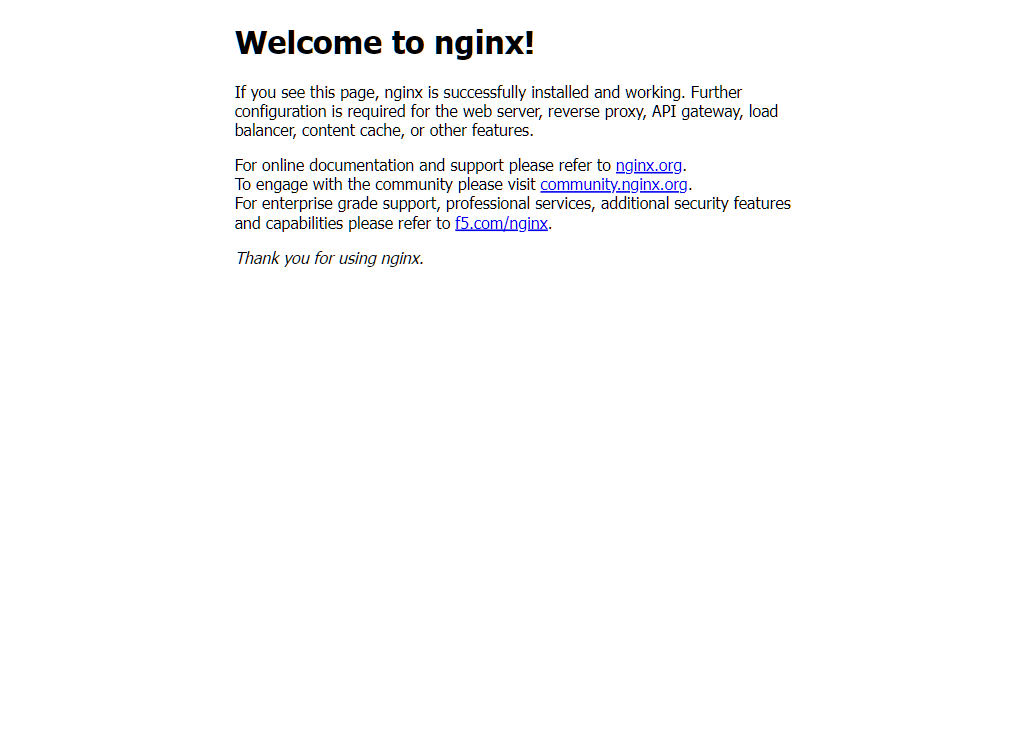
Open http://127.0.0.1:8087/ on the same computer. In a third terminal, curl.exe --fail http://127.0.0.1:8087/ should return Welcome to nginx! The browser path is local port 8087 → kubectl → the Arc API connection → NGINX port 80. No host SSH connection or public firewall rule is needed.
Ctrl+C in Terminal B closes only web forwarding. Stop Terminal A only when no other lab session needs it. If a pod connection changes, port-forward can terminate; verify pod readiness and reconnect. If authentication expires, sign in to the isolated context again. Do not redeploy the cluster merely because a client tunnel stopped.
4.9 Diagnose and reverse at the smallest failed boundary
| Gate / execution context | Success evidence | Failure mode and recovery |
|---|---|---|
| Azure CLI client → ARM / Arc over HTTPS 443. | One completed deployment, intended cluster ID, connected bridge/extensions, scoped create/connect/API roles. | 403 or denied deployment: inspect the exact action/scope and inherited policy. Do not grant every tenant user cluster administration. |
| AKS nodes / platform network. | All expected Kubernetes nodes Ready, free IPs/capacity, API reachability, healthy kube-system DNS pods. | NotReady or address exhaustion: inspect node events, allocation pools, VLAN/DNS/egress. Repair dependencies, not individual ATC-managed switches. |
| Pod → registry and service dependencies. | Reviewed image/digest can be pulled; kube-DNS resolves required names; requests fit available memory/CPU. | ImagePullBackOff: inspect registry authentication, DNS and HTTPS egress; Pending: inspect scheduling/events and resource requests before resizing. |
| Application / service / client forward. | Readiness succeeds, restart count stable, service selectors yield ready endpoints, loopback HTTP response received. | CrashLoopBackOff or failed probes: inspect redacted pod logs/events and probe path/port. A Running pod or ClusterIP alone is not success. |
The client proxy and application forward are separate management sessions: local port 47031 reaches the Kubernetes API, while local port 8087 forwards to the selected application backend. Neither provides public ingress, a routable service VIP, or general access to the workload subnet. Keep both loopback-bound. Registry/DNS testing must originate from the relevant nodes/pods; a successful laptop download does not prove cluster egress. Follow the AKS logical-network requirements and distinguish external DNS reachability from kube-DNS service health.
Rollback application changes with the reviewed previous manifest/image; a Deployment rollback alone does not reverse changed ConfigMaps, Services or database schemas. Delete only the dedicated namespace when its contents are confirmed disposable; do not remove a shared logical network or infrastructure extension. For failed cluster provisioning, inspect outstanding operations and use the supported cluster lifecycle cleanup after approval, retaining evidence first. Never delete AKS-managed VMs in Hyper-V as a shortcut.
Handoff: retain sanitized version/size discovery, validation and operation timestamps, role scopes, node/readiness/restart/resource/probe results, DNS/registry checks, and the HTTP observation interval. The screenshot establishes only the recorded NGINX response through the lab forward, not a new deployment or sustained SLA. Alert delivery, update rollback and restore remain unverified until their owners demonstrate them. Remove temporary elevated lab role assignments when access is no longer needed.